Pages

Showing posts with label marketing. Show all posts

Wednesday, February 12, 2014

Gardening Postcard

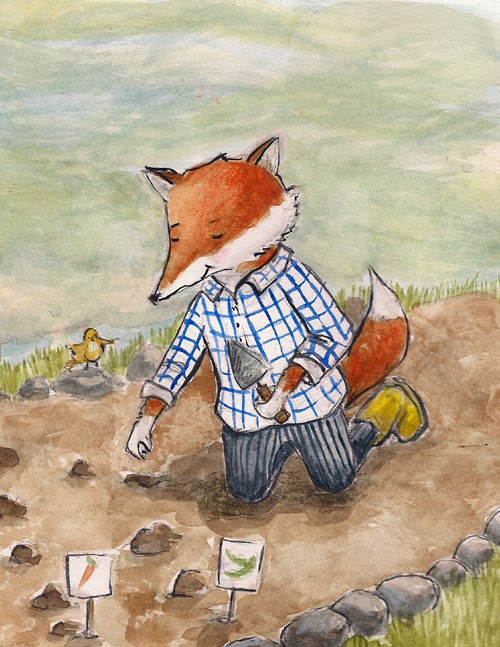
This is my latest personal project.  I've had these sketches done since last year, but just now pulled them out to paint.  Some projects are late bloomers. I think I'm going to put him on a journal, he looks like he would make a good garden journal cover, don't you think?

This is the second piece, I'm also working on a third one of the garden completely in bloom.  I'm so ready for spring.  I can see why gardeners spend the winter planning, hope is good when winter seems to go on forever!

The final postcard.  I'm not a designer, so I keep things as simple as possible.  
And in black and white, which is what I used on the back of my postcard.

Now to finish my new website and polish up my mailing list, because it's been years since I've sent out a postcard!


Monday, February 21, 2011

Website Woes & Tips, Part 2

Here are some tips to personalize a Carbonmade portfolio to make it feel more like a website.

Customize Thumbnails Into an Image Grid:

You can use the Carbonmade template as is for your website, with different thumbnails for each category (like the image below) or you can break up a larger photo for more visually impact.

For the most dramatic and successful use of this tweak, check out the amazing portfolio from Kristen Ulve. This portfolio uses the wide thumbnail option.  There is also this one from Gilad Seliktar that uses a grid of three thumbnails.  And my portfolio uses the 2 across grid format.

(My first version of the website and here is the new one)

To change the thumbnails, first go into your Carbonmade account and hover the cursor over the thumbnail image, a 'change thumbnail' button will appear. Click on it and it provides the dimensions of the thumbnails.  With  photo imaging software break up a larger image into boxes that fit the thumbnail dimensions.  

Turn Projects into Pages
With the paid portfolio you have 50 projects or pages.  These pages can use html to create pages that offer more information than what you may want to include in the About page.  I also think the about page can get overlooked and some things - like a "contact page" or 'services offered" deserve their own space. 

A few extra pages I included were: contract, follow me (with my social media links), presentations and books. 

HTML Cheatsheet - add images to your page, live links, make text bold or align your page with a few basic lines of html code.

Take Advantage of the Footer
Under the 'Personalize' tab you can add your name with a copyright date.  This area also accepts html code and you can add in the code for your newsletter subscription box, contact information and links to your blog, twitter and facebook.  This footer shows up on every page.  So at the very least, as your contact information here to so your clients can easily reach you. 

Customize Your Banner
Under the same 'Personalize' tab you can add in your logo to brand your website.  I use a hand-lettered logo that appears on my blog and print materials for a cohesive visual.

Your Own Domain
In general you don't want your portfolio to address to be www.yourname.carbonmade.com - this is called a subdomain name, which is the default.  Carbonmade offers the option to use your own domain name so that your portfolio will publish as www.yourname.com.  It's more professional to have the domain name.  There are directions to follow and help available through carbonmade to set this up.  Another option would be have your domain name forward to your portfolio.  Check with your hosting company for details on how to set up a domain forwarding. 

Wednesday, February 16, 2011

Website Woes & Tips, Part 1

So I started my weekend off with every intention of creating a new portfolio website.  I had looked over my options and thought the most professional way to go would be to self-host a Wordpress blog/website combination that featured a gallery of my work.

I bought a new domain name - it was time for a change. I knew that Go Daddy had hosting support for Wordpress, so I purchased the hosting package.  After getting things set up, I went off to find a template that fit my needs

Okay - fast forward to 3 hours later.  I could not find a template under $50 that fit my needs.  I settled for one I thought I could do a little adjusting with and purchased it.  Off to Go Daddy to install and start posting.  Only wait, it's not easy to hack.  It's not intuitive and I quickly realize I have no idea what I'm doing here.  I need a tutorial, I need a manual, I need a class, I need a designer!  5 hours into the ordeal I say to heck with it.  I'm going with a portfolio site.

An hour later, new website is up and running and ready to go.  With a little help from Godaddy, I transferred the domain name to the portfolio site and created a subdomain for my blog.  Everything now publishes under heatherpowersart.com.

I went with Carbonmade for my portfolio site for a couple of reasons:
  1. I had tried their free version and liked how easy it was to set up.
  2. Great value - for the same price I was paying for a 10 page website. I get 50 projects (pages) and 500 images.  It's ad free, they have tech support and you can have private projects that aren't published on the site. Oh and it looks good on mobile devices and has a separate page for each image.
  3. I saw that Julie Fortenberry was using it and liked the way it looked, it was nice to see someone else using it.
  4. I knew from looking at some of the examples that you could do some tweaking to customize the site to make it look less like a template.
So my advice - if you are not a designer and are looking for a webite option, I recommend going with a portfolio site that you can customize and use domain forwarding.

Why torture yourself with trying to design a website?

Find something that is simple to use and minimal in design so that your artwork is shown in a professional manner.  Then after you get a big juicy book contact, by all means hire a brilliant designer to create the website of your dreams.

Join me tomorrow, I will share some little cheats that I did to make the Carbonmade template more like a website.

*I'm not affiliated with GoDaddy or Carbonmade - just happy they exist!

Friday, January 14, 2011

2011 Goals

My laundry list:
Sketch daily
Take a watercolor class
Create a watercolor portfolio
Finish 3 dummy books
Submit those dummy books
Send out 4 postcards
Submit a kids craft book proposal
Create a holiday licensing portfolio

How to accomplish a goal:
1. Write it down
2. Give it a deadline
3. Break it down into baby steps
4. Schedule time for those baby steps
5. Reward yourself for goals accomplished

Friday, December 4, 2009

Take a Chance!


On what?  Entering contests - you just never know!  First I will say that contests are so subjective that if you enter and don't win, don't sweat it.  At the very least you'll have new work for your portfolio and that is always a good thing.

I haven't worked my way up to entering the illustration contests outside of the children's book world, but I do enter SCBWI portfolio contests as often as I can.  Before I won the Tomie dePaola Portfolio Award last year there was a moment a few weeks before the conference where I almost talked myself out of not entering.  What a shame that would have been!

Get your work out there and see what happens.


So a month or so ago when I learned about Picture Book's contest, I immediately entered.  The grand prize is a page in their annual, that would be sweet and 4 runner-ups will receive an online portfolio.  That wouldn't be too shabby either. 

So guess what?  I'm one of the 30 finalists.  They will announce the winners mid-January.  Cross your fingers, knock on wood, rub a horseshoe, eat a four-leaf cover and all that jazz for me!!!

Sunday, November 22, 2009

Juicy!


Have you found this little online gem?  The Red Lemon Club is a new blog dedicated to online promotion for creative freelancers.  Love the practical advice and good tips.  Be sure to subscribe or add it to your blog reader so you don't miss a post!

Of course, actually using the advice would be better!  Marketing can seem like an overwhelming task.  Take it one step at a time and focus on a specific goal.

Thursday, November 5, 2009

Twitter Links for Authors and Illustrators

Below are a few little sketches for a twitter icon for my blog.  You know, since it's all shiny and new I want to give it a little extra spiffin' up.  I think I'll carve up all three and see which one I like the best and then offer them for the general public to use if they wish. 


I LOVE the children's book twitter world.  There is inspiration and information to be had on a daily basis.

*Remember to mind your manners on twitter, it's public and you never know who might read your tweet. 

*Don't be a pest and direct message agents or editors, I think that's right up there with passing the manuscript under the bathroom stall at a conference. (Also a no-no in case you were thinking, yeah that's a great idea.)

*Your tweets should be entertaining, informative or inspiring.  (No lunch or laundry tales unless it fall under one of the three categories just mentioned.)


Here are some good links if you want to get started.


 See you around the water cooler.

Tuesday, November 3, 2009

2010 CWIM


I certainly can not talk about marketing without mentioning the 2010 Children's Writer's & Illustrator's Market.  I never miss picking up a copy of this annual guide.  This year they added an online feature for up-to-date listings, which is so vital in an industry that is constantly changing.

Along with the listings of publishers I love the articles and features.  I have saved all my market guides and refer back to them over the years.  There is a little nugget in each one and as you grow in your career articles that you once glanced over suddenly become critical information.  This one is jam packed with online marketing tips that I'm loving! 

I've been working on updating my mailing list for 15 minutes a day and I have a new postcard sketched out and need to work on carving that bad boy this week.  Moving right along.

21 Day Marketing Plan


Nothing like the excitement of a new project to get my creativity rolling.  I love the beginning of projects, when all possibilities are open and the road is yet traveled.  So here we start Humblearts Journal on blogger. I've had my blog for a few years but over the last two years it's been beyond neglected. My old computer is not a fan of typepad and I'm over here blogging almost everyday anyway for my beady empire.

So what shall we start with?  A list and a plan for November.  I'm giving a presentation at our next SCBWI meeting on Marketing for Authors and Illustrators.  So I need to practice what I'll be teaching and preaching.  I'm great at the knowing, not so good at the doing!

Daily:
twitter/facebook/blog - keep up with what's going on in the industry, get my name & work out there.
Update my mailing list for 15 minutes day.

Week One:
Create new blog
Update website with new work
New promo image

Week Two:
Work on 2 new dummy samples
Send out postcards
Outline for craft book proposal

Week Three:
Send out dummy
Write query letter
Marketing research for craft book proposal

Bite size, specific and with a deadline.  Now that's how you set a goal.  (Illustrator quakes in boots, must stay consistent...)